Campaign List
If you have more campaigns than the game's default Campaign Selection menu
supports you can switch to a campaign list as in Tiberian Sun.
Ares supports an arbitrary number of campaigns. Every non-debug battle
listed in battlemd.ini will show up in the list under the name defined
by Description=.
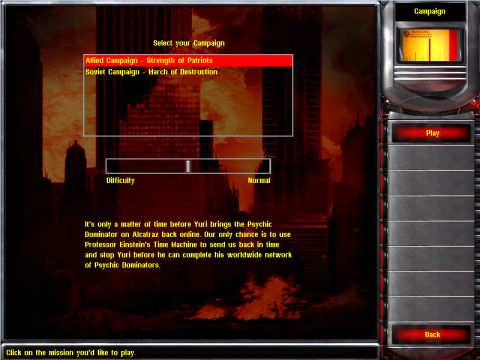
Enable the campaign list in uimd.ini:
[UISettings]►CampaignList=(boolean)Enables the campaign list instead of the game's default menu. Defaults to no.
[UISettings]►CampaignListSize=(integer)The number of campaigns shown in the Campaign list without scrolling. The number of campaigns shown cannot be less than 3. The maximum number depends on
ShowSummary. Defaults to 7.[UISettings]►ShowSummary=(boolean)Whether the campaign list displays a campaign's
Summarybelow the difficulty selection. If shown, the maximum campaign list size is 14, otherwise it is 18. Defaults to yes.[UISettings]►ShowDebugCampaigns=(boolean)Also displays campaigns in the list that have DebugOnly=yes set. Defaults to no.
You can customize the campaigns in the list by editing battlemd.ini:
[Battle]►HoverSound=(sound)The sound to be played when the player selects a campaign. This defaults to AlliedCampaignSelect, SovietCampaignSelect, and BootCampSelect for the original in-game campaigns. The selection menu plays them when the mouse hovers over the respective campaign's image.
[Battle]►Summary=(CSF label)Provide an optional summary of the campaign's or mission's story. It will be shown below the difficulty slider if not disabled using
[UISettings]►ShowSummary.
Added in version 0.2.
在 0.9 版本发生变更.